

Dose by weight
Start with a clear coffee dose and target beverage yield for espresso or filter.
Microbalance workflow
Microbalance tracks the core brew variables in real time: dose, yield, time and pour flow. CoffeeOS turns that data into repeatable recipes.
Start with a clear coffee dose and target beverage yield for espresso or filter.
Use the timer and flow-rate display to keep pours consistent across brews.
CoffeeOS can mark pouring stages and convert brew data into reusable recipes.
Use saved recipe data to come back to the same cup instead of rebuilding from memory.
Key details
Microbalance controls dose, time, yield and flow rate. R2 Extract checks TDS and extraction after brewing.
It combines weighing, timing, flow-rate display and CoffeeOS recording. That makes it more useful for repeatable coffee recipes than a basic kitchen scale.
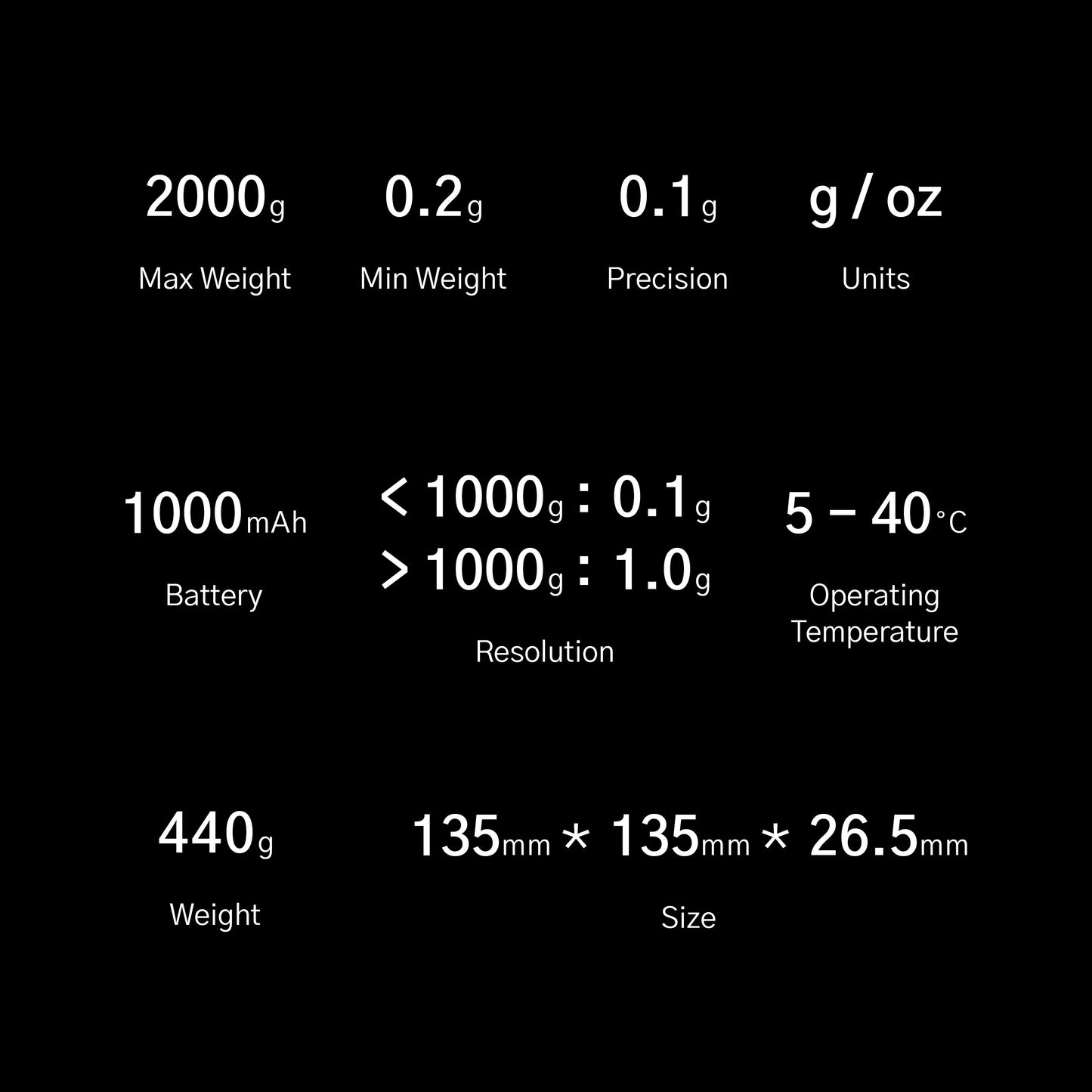
Yes. The compact footprint and 0.1g readability make it suitable for espresso output tracking. Check your machine drip-tray clearance before ordering if space is tight.
Yes. The 2000g max load, timer and flow-rate display are useful for pour-over recipes where water total and pour speed both matter.
Yes. Microbalance works with CoffeeOS for Brew Ratio Calculator, Brew Recorder and Brew Controller workflows.